Udemy Kling 3.0

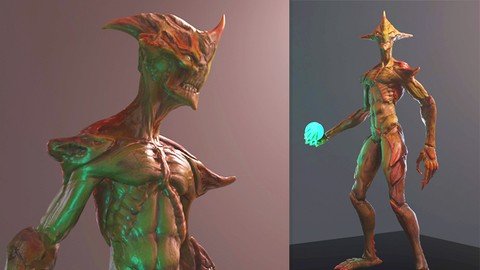
3D Game Character Creature – Full Complete Pipeline
By Victory3D LLC Posted: Jul 30, 2026

Course Details

Pricing Paid
Offered By Udemy
Difficulty Intermediate
Duration Approximately 44.5 Hours On-Demand Video
Language English
Certificate Available

Course Curriculum & Description

Learn the complete production pipeline for designing and building AAA-quality 3D game characters and fantasy creatures from concept to final game-ready asset. This comprehensive course covers every major stage of modern character creation using industry-standard tools including ZBrush, Maya, Substance Painter, Photoshop, and Unreal Engine.

You'll begin by sculpting a high-resolution creature model, followed by retopology, UV mapping, baking, texturing, material creation, rendering, and final presentation. The course also introduces professional production workflows used by game studios for creating optimized assets ready for real-time engines.

Whether you're an aspiring character artist, game developer, digital sculptor, or 3D designer, this course provides practical, project-based training to build a complete production-ready character portfolio.


Module 1 — Introduction

  1. Course Overview
  2. Production Workflow

Module 2 — Creature Sculpting

  1. Blocking Shapes
  2. Anatomy
  3. High-Resolution Sculpting

Module 3 — Retopology

  1. Low Poly Creation
  2. Edge Flow
  3. Optimization

Module 4 — UV Mapping

  1. UV Layout
  2. Efficient Packing
  3. Texture Preparation

Module 5 — Baking

  1. Normal Maps
  2. Ambient Occlusion
  3. Curvature Maps

Module 6 — Texturing

  1. Substance Painter Workflow
  2. Smart Materials
  3. PBR Texturing

Module 7 — Rendering

  1. Lighting
  2. Camera Setup
  3. Final Presentation

Module 8 — Unreal Engine

  1. Asset Import
  2. Materials
  3. Real-Time Rendering

Module 9 — Final Project

  1. Portfolio Presentation
  2. Professional Export


What You Will Learn

  • Master AAA game character workflows
  • Build production-ready assets
  • Understand digital sculpting techniques
  • Optimize models for games
  • Improve topology skills
  • Create realistic textures
  • Produce portfolio-quality renders
  • Learn modern game art pipelines
  • Prepare assets for Unreal Engine
  • Develop professional 3D art skills

Course Prerequisites

Basic computer knowledge
Passion for 3D art or game development
Familiarity with 3D software is helpful but not required
Recommended software:
ZBrush
Maya
Substance Painter
Photoshop
Unreal Engine

Course Highlights

Complete Character Creation Pipeline
AAA Production Workflow
Digital Sculpting
Retopology Techniques
UV Mapping
Texture Painting
PBR Materials
Unreal Engine Integration
44.5 Hours of Content
Certificate of Completion

Tagged Topics & Skills

Categories:
Skills Mapped:
3D Character Design Creature Creation ZBrush Autodesk Maya Substance Painter Photoshop Unreal Engine Digital Sculpting Retopology UV Mapping Texture Painting PBR Workflow Game Asset Creation Character Modeling Rendering Portfolio Development

Ready to Start Learning?

Enroll directly on the official Udemy website to begin your lessons.

Open Course Website

Associated AI Tools

Facefame

About FacefameFacefame is an AI-powered photo and avatar generator that transforms a single photo into different creative and professional visuals. It can create AI avatars, professional headshots, ID photos, animated avatars, and profile videos in just a few steps. Facefame is designed for social media users, professionals, students, creators, and anyone who wants to create attractive AI-powered photos without advanced editing skills.Uses of FacefameFacefame helps users turn ordinary selfies into creative AI-generated images. Users can create anime avatars, cartoon characters, 3D avatars, portrait-style images, social media profile pictures, and other personalized visuals. The process is simple: upload a photo, choose a style, and let the AI generate the result.The platform is also useful for professional and personal branding. Users can create LinkedIn profile photos, resume pictures, business portraits, ID-style photos, and animated profile videos. It can also generate personalized showcase videos and dynamic character portraits, making it useful for social media content and online profiles.Facefame AI Models & Sub-ModelsAI Avatar Generator is Facefame's main AI feature for transforming a single photo into different avatar styles. Users can create anime avatars, cartoon characters, 3D avatars, portrait-style avatars, and social media profile images.Professional Portrait Generator creates polished professional portraits from ordinary photos. It can be used for LinkedIn profiles, resumes, business profiles, networking platforms, and personal branding.AI ID Photo Generator helps users create ID-style photographs with different background options. It supports use cases such as passport photos, visa photos, driver's license photos, job applications, and student ID photos. Users should always check the official requirements before using an AI-generated photo for an official document.Animated Avatar Generator turns static photos into animated avatars and profile videos. This feature can help users create more engaging social media profiles, personal showcase videos, and creative content.AI Portrait Video Generator helps bring still portraits to life by creating dynamic video content. It can be useful for profile videos, social media posts, personal branding, and creative presentations.PricingFacefame is Free to Download and offers In-App Purchases for additional features and content. Some AI effects and features can be tried for free, while additional generations or premium content may require payment. Pricing and available features can vary by platform and region.Free: YesPaid: Yes, through in-app purchasesFree Trial: Some features can be tried for freeBest Use CasesFacefame is an excellent tool for social media users, professionals, students, content creators, and people interested in AI photography. It can be used to create LinkedIn headshots, resume photos, social media avatars, anime characters, cartoon portraits, 3D avatars, ID-style photos, animated profile videos, and personal branding visuals. With its simple photo-to-AI workflow, Facefame makes it easy for beginners to create personalized images without learning complicated photo-editing software.
Free

Pixmax.ai

Pixmax AI is an all-in-one creative platform for generating images, videos, text, audio, and 3D content. It brings many leading AI models into one workspace, so users can create and compare content without managing multiple AI subscriptions. Pixmax also includes visual workflows, an infinite canvas, asset management, storyboards, templates, and team collaboration features for professional creative projects.Uses of Pixmax AIPixmax AI can turn ideas, scripts, and prompts into images, advertisements, short videos, cinematic scenes, storyboards, product visuals, and social media content. Users can combine text, image, video, and audio generation in the same project, while its AI video workflows can automatically create characters, scenes, storyboards, and video clips from a script.The platform is also useful for professional creative production. Users can create reusable characters, scenes, brand styles, and assets, compare different AI models, upscale images and videos, remove subtitles, customize voices, and export finished content. Teams can collaborate on projects and use templates for commercials, short dramas, game cinematics, and cinematic animation.Pixmax AI Models & Sub-ModelsVideo Generation Models include Wan 3.0, Seedance 2.5, Seedance 2.0, Kling 3.0, Veo 3.1, Hailuo 2.3, Vidu Q3 Pro, Wan 2.6/2.7, and PixVerse V6. These models provide different options for cinematic videos, social content, product videos, storytelling, and image-to-video generation.Image Generation Models include GPT Image 2, Nano Banana, Seedream 5.0, Flux, Midjourney, Ideogram, and PixVerse image models. They can be used for realistic images, advertisements, product visuals, characters, concept art, thumbnails, and creative designs.Text Models include AI models such as Claude, Gemini, DeepSeek, Doubao Seed, and other supported language models. These models can help with writing, scripts, creative planning, analysis, and other text-based tasks inside the Pixmax workflow.Audio & Voice Models include ElevenLabs V3, ElevenLabs Music, MiniMax Speech, and MiniMax Music. These models support voice generation, narration, voice customization, music creation, and other audio requirements for AI videos and creative projects.3D Models include Hunyuan3D Pro 3.1, which is designed for generating 3D assets and supporting workflows such as game assets, product visualization, and 3D creative production.Pixmax AI Video Agent helps automate the video-production process. Users can provide a script or idea, and Pixmax can generate characters, scenes, storyboards, and video clips while still allowing users to review and edit the creative direction.Pixmax AI Cinematic Control provides creative controls for building more consistent and controlled visual content. Combined with the Stage Editor, Infinite Canvas, and Workflow Templates, it helps creators organize and refine larger AI video projects.PricingPixmax AI offers a Free option that lets users try the platform with free credits and selected model access. Paid plans currently include Starter at $8/month, Pro at $42/month, Ultra at $234/month, and Max at $468/month, with higher credit allowances and additional production capacity. Pixmax also offers pay-as-you-go credit packs starting at $15, while enterprise pricing is customized.Free: Yes, free credits availablePaid: Yes — Starter, Pro, Ultra, Max, and EnterpriseFree Trial: Yes, free access is available with no credit card requiredBest Use CasesPixmax AI is best suited for AI video creators, filmmakers, marketers, advertising agencies, social media teams, ecommerce brands, designers, game developers, and creative studios. It can be used for advertisements, product videos, YouTube Shorts, social media campaigns, cinematic storytelling, AI short dramas, game trailers, character creation, storyboards, product visuals, voiceovers, and large-scale content production. Its biggest advantage is bringing many leading AI image, video, text, audio, and 3D models into one organized creative workspace, reducing the need to switch between multiple AI platforms.
Free

Deepl

About DeepLDeepL is an AI-powered language translation and writing assistant that helps users translate text, documents, and conversations with high accuracy. It supports multiple languages while preserving the original meaning, tone, and context. DeepL is trusted by students, professionals, businesses, translators, and content creators who need fast, natural, and reliable translations for personal and professional communication.Uses of DeepLDeepL helps users translate documents, emails, websites, presentations, and business content into multiple languages with natural-sounding results. It can translate Word, PowerPoint, PDF, and text files while maintaining formatting, making it a valuable tool for businesses, educators, and professionals working with multilingual content.The platform also includes AI-powered writing assistance that helps improve grammar, rewrite sentences, adjust tone, and enhance clarity. Businesses use DeepL for international communication, customer support, content localization, and document translation, while students and travelers use it to learn languages and communicate more effectively across different regions.DeepL Models & Sub-ModelsDeepL Translator is the platform's core AI translation model that delivers accurate and natural translations across multiple languages. It understands context and sentence structure, helping produce translations that sound fluent and human-like.DeepL Write is an AI writing assistant that improves grammar, spelling, punctuation, sentence structure, and writing style. It also rewrites text to make it clearer, more professional, or easier to understand while preserving the original meaning.DeepL Voice enables real-time speech translation, allowing users to translate spoken conversations instantly. It helps people communicate naturally across different languages during meetings, travel, and business discussions.DeepL API allows developers and businesses to integrate DeepL's translation and writing capabilities into websites, mobile apps, business software, and customer support systems. This makes it easier to automate multilingual communication and content localization.PricingDeepL offers a Free Plan with access to its core translation features and limited document translation. It also provides Paid Plans, including DeepL Pro, which offer unlimited text translation, larger document uploads, enhanced security, API access, and advanced writing features. Users can start with the free version and upgrade as their translation needs grow. A Free Trial is available for eligible DeepL Pro plans.Best Use CasesDeepL is an excellent tool for students, translators, writers, businesses, educators, travelers, and multinational organizations. It can be used to translate documents, websites, contracts, emails, presentations, and marketing materials while maintaining natural language quality. It is also ideal for improving writing, localizing business content, communicating with international clients, and creating multilingual content quickly and accurately. With its powerful AI translation technology, DeepL helps users communicate confidently across languages.
Free

Related Courses

The Complete Video Editing Series | HINDI Paid
Udemy 5 hours 56 minutes

The Complete Video Editing Series | HINDI

Learn professional video editing in Hindi with Adobe Premiere Pro, DaVinci Resolve, and After Effects, covering editing, audio, color grading, motion graphics, animation, and export workflows.

Beginner
Advanced Agentic AI and Generative AI Paid
Udemy 2.5 hours on-demand video

Advanced Agentic AI and Generative AI

Learn Generative AI and Agentic AI with Python, covering LLMs, prompt engineering, AI agents, RAG, vector databases, multi-agent systems, tool calling, and real-world AI applications.

Beginner
Adobe Firefly: A Guide to Generative AI Art Paid
Udemy 32 minutes

Adobe Firefly: A Guide to Generative AI Art

Learn Adobe Firefly to create AI-generated artwork using text-to-image, generative fill, prompt design, and text effects with practical beginner-friendly lessons.

Beginner 3.8